Transitioning Your Lab from Paper Notebooks to an ELN
For centuries paper notebooks have been integral tools for scientists who laboriously and carefully recorded specific details of their research and experiments.
That picture began to change in the 1990s with the development of the ELN (electronic lab notebook.) An ELN is a digital version of the traditional lab notebook. Like a paper notebook, it documents the who, what, when, where, how, and why of daily activities in the lab.
This article explains the
benefits of a paperless lab, identifies the hurdles researchers face in implementing an ELN, and addresses the keys to a successful transition from paper notebooks to an ELN.
Why should your lab transition from paper notebooks to an ELN?
Two essentials of scientific discovery are 1)
reliable data in a format that’s accessible and easy-to-use and 2)
time efficiencies that help researchers get critical products to market in a timely fashion. An ELN surpasses paper notebooks in the ability to provide both of these critical elements.
Enhanced data quality
An ELN’s collection, retrieval, and analysis features help scientists generate data that is:
Legible
In a perfect world, lab notes would always be written neatly. They’d never have anything spilled on them. They would be stored securely, protected from moisture, aging, and disasters like fires and floods.
Unfortunately, even the most meticulous laboratory environment isn’t perfect. Some notes are legible only to the scientist who wrote them. Accidents happen. Occasionally, disaster strikes.
The result is that a percentage of notes are unusable. Scientists may disagree over how widespread the problem is, but they concur that not all hand-written lab notes are legible.
Accurate
Extremely precise formulas can be solved instantly, accurately, and repeatedly, regardless of the researcher who performs the calculations. The system incorporates date and time stamps as well as user identification to verify who did what.
A growing number of ELNs–including the hybrid SciCord ELN/LIMS–also utilize a spreadsheet format. With a spreadsheet, researchers can enter one–or hundreds–of formulas that automatically calculate data entered into the cell. This feature reduces entry errors and saves time for scientists and reviewers.
Accessing and retrieving information stored in paper notebooks can be a nightmare, especially if the data is stored off-site. Rifling through dozens–or hundreds–of notebooks takes time, even if items are stored carefully and consistently. Locating the exact page with the specific details requires more time. The process can be tedious and time-consuming, even when all team members follow protocols precisely.
Using a search function, an ELN allows you to quickly access mountains of data and retrieve the precise information needed.
“
You have everything in one place; you can easily search through your data using keywords, and you can find all your data instantly.”
– Jana Erjavec, Ph.D., on SciCord ELN/LIMS
In addition to standard search functionality of sample and document descriptions, some ELNs (including SciCord ELN/LIMS) support definition of data attributes and incorporate filtering on a much more granular level.
Shareable
Scientists working on projects that utilize the same data can share their insights and results with others without sacrificing control or having their data compromised. ELN security protocols limit access to the data and restrict–or deny– data manipulation.
The shareable feature also mitigates difficulties that arise when a researcher gets sick, takes a vacation, retires, or leaves the lab to work elsewhere. Work that relies upon that person’s data isn’t delayed or halted altogether.
While no ELN can guarantee 100% security, electronic notebook systems provide superior data protection compared to paper notebooks. Unlike paper notebooks, an ELN offers safety measures that include layered passwords, encryption, replication, regular data backup, and–often–multiple storage locations.
Time efficiencies
The adage– “Time is Money” –is true, particularly in the pharmaceutical industry where, according to a
study completed in 2020, “the median cost of getting a new drug into the market was $985 million, and the average cost was $1.3 billion.”
Those statistics make a strong case for transitioning to an ELN. A survey by SciNote asserts that, “On average, researchers save 9 hours per week by using an ELN, while doing the same amount of work!” Thus, with a 40-hour work week and a 50-week work year, researchers would finish the year’s planned activities halfway through week 39.
Time savings accrue in virtually every part of the lab–data entry, search, and retrieval; calculations and statistics; inventory control and labeling; and documentation and reports. These efficiencies allow researchers to accomplish more with an ELN than they could without one.
What hurdles will you face as you transition your lab from paper notebooks to an ELN?
An ELN provides solutions for some of the most pressing issues facing labs today. However, utilization remains low.
“
Less than 10% of researchers are using an electronic lab notebook today.”
– Dr. Simon Bungers
From LabFolder
Why is that? Here are the difficulties scientists frequently mention:
No pressing need to change
Many labs don’t see the need to change, even though they know that technology has affected virtually every other aspect of scientific discovery. It’s not just that paper notebooks have been the status quo for centuries. Some scientists suspect that ELN systems may cause bigger problems than they solve.
Worries about decreased control and security
When ELNs first hit the market, researchers in virtually every field questioned the wisdom of releasing control of their data. They knew the shortcomings posed by paper notebooks but still felt that their data was safer when they controlled where it went and who accessed it.
That feeling has shifted a bit, but some scientists–especially those who meticulously follow data safety protocols and adhere to GLP (Good Laboratory Practices)–are still reluctant to trust an ELN.
Complexity of learning and using an ELN
Since laboratory science is a complex world of testing and discovery, it demands attention to detail and intense focus. Some scientists worry that an ELN will add an unnecessary level of complexity that will muddle or derail their professional focus and lead to costly errors.
Cost
Each ELN is tailored to the lab that uses it. Therefore, there’s no accurate estimate of the cost to implement an “average” ELN for an “average” lab. The cost varies based upon the number of users, the scale of the lab’s required services, and whether the ELN is hosted or located on-premise.
The initial cash outlay to install and coordinate the hardware and software needs of an ELN deters some labs from making the switch. Decision-makers also need to account for the subscription cost of a hosted ELN or the required hardware upgrades for an ELN that’s located on the premises.
What are the keys to successfully transitioning from paper notebooks to an ELN?
Key person(s) to facilitate the process
Successful transitioning from paper notebooks won’t happen without one or more people from your lab who facilitate the process by:
- Determining and communicating the benefits of transitioning. What specific problem areas will the ELN address? How will this help everyone in the lab?
- Setting the timeframe of the transition. What schedule will be optimal? How long will the process–realistically–take? When will the ELN feel like a valuable asset rather than a liability?
- Interfacing with the provider. The facilitator must be able to field questions from the researchers and provide answers promptly.
A mindset that accepts the change as a transition, not a fixed-point change
Implementing any systemic change takes time. Virtually everyone in the lab will have to transition both mentally and physically.
A transition team composed of personnel from the lab and the ELN will be integral to the process of tactfully and skillfully guiding researchers as they learn the nuances of the software and how to adhere to GLP while using it.
Appropriate timing
In a busy lab, there will never be a perfect moment to switch from paper notebooks to an ELN. Research and experiments that are already in progress will be disrupted. Everyone’s productivity will dip briefly while he or she acclimates to the ELN.
However, given the financial benefits of implementing an ELN, waiting for the perfect moment could be very costly, both in terms of the rate of getting drugs on the market and in the additional ROI the lab could generate with an efficient ELN. Unless the lab is facing a crisis, the best time to transition to an ELN is now.
An excellent ELN provider
An excellent ELN provider for your lab is the one that meets your needs and supports you during and after the transition. As you choose a provider, ask these questions:
- Is their ELN easy to integrate and use?
- Does this provider have feedback from satisfied customers who appreciate their software–and their service?
- Do they offer a demo to help you get a true feel for their software?
- What type of hosting do they provide?
- How do they help a customer safely and quickly transition from paper notebooks to an ELN?
SciCord is a hybrid ELN/LIMS, featuring a spreadsheet paradigm, that combines the compliance and structured aspects of a Laboratory Information Management System (LIMS) with the flexibility of an Electronic Laboratory Notebook (ELN). The ELN and LIMS functions integrate seamlessly and enable your company to quickly reap the benefits of enhanced data and time efficiencies as you continue to meet compliance standards and follow GLP.





















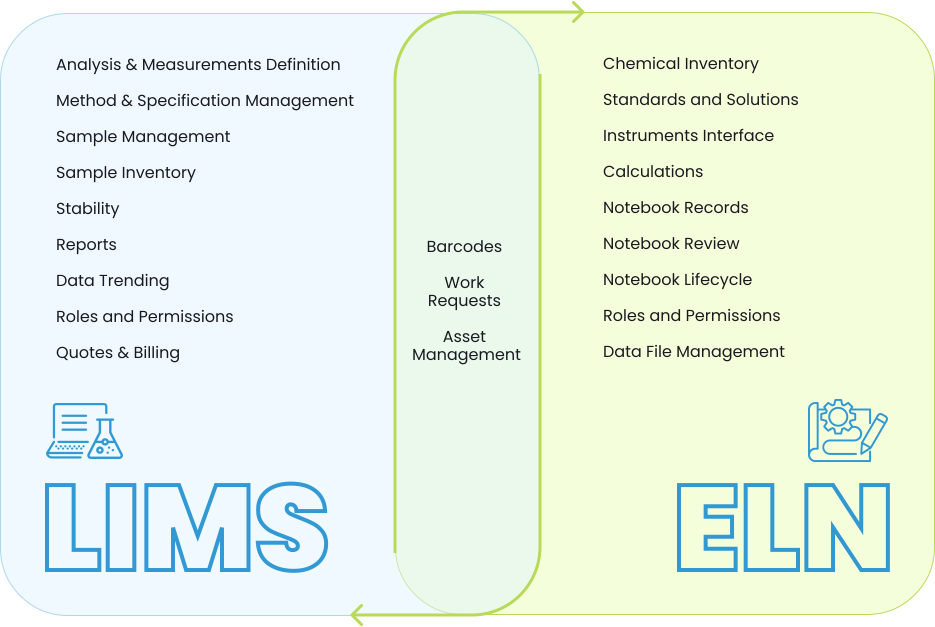 In general, administrative/management functions are allocated to LIMS with bench related processes encapsulated in ELN. An underlying assumption guiding the division of functionality is that ELN will be readily available and active on laboratory benches. Laboratory functionality has been grouped within ELN to take advantage of the readily available access and to avoid inefficient transitions between applications. Allocation of functionality which is not self-evident is described in more detail below.
Configuration item definition and management (Methods, Analysis, Measurements) are handled by LIMS although these configuration items are used extensively by both ELN & LIMS. LIMS is the natural placement for configuration.
Barcode functionality must be present in LIMS to support Sample Management and in ELN for chemicals, solutions, and standards. Implementing in both solutions does increase maintenance overhead.
Work Requests are the definition of the testing or other work to be accomplished on samples and includes visualization of the status of assigned work. Work generated by stability or external sources is managed by LIMS while work originating internally is defined by ELN. Interface of Work Requests is the most complex interface task. The interface requires sharing user/group/site information in addition to sample/analysis/methods.
Chemical Inventory is allocated to ELN because the task is physically executed in laboratories.
Data File Management is provided by ELN unless an Enterprise Content Management solution is deployed for this purpose.
Notebook records, review, and lifecycle are consolidated in ELN.
Asset Management is a shared functionality. LIMS provides equipment and instrument definitions while ELN records daily check and usage information. The LIMS portion of Asset Management may be provided by a standalone Metrology application.
In general, administrative/management functions are allocated to LIMS with bench related processes encapsulated in ELN. An underlying assumption guiding the division of functionality is that ELN will be readily available and active on laboratory benches. Laboratory functionality has been grouped within ELN to take advantage of the readily available access and to avoid inefficient transitions between applications. Allocation of functionality which is not self-evident is described in more detail below.
Configuration item definition and management (Methods, Analysis, Measurements) are handled by LIMS although these configuration items are used extensively by both ELN & LIMS. LIMS is the natural placement for configuration.
Barcode functionality must be present in LIMS to support Sample Management and in ELN for chemicals, solutions, and standards. Implementing in both solutions does increase maintenance overhead.
Work Requests are the definition of the testing or other work to be accomplished on samples and includes visualization of the status of assigned work. Work generated by stability or external sources is managed by LIMS while work originating internally is defined by ELN. Interface of Work Requests is the most complex interface task. The interface requires sharing user/group/site information in addition to sample/analysis/methods.
Chemical Inventory is allocated to ELN because the task is physically executed in laboratories.
Data File Management is provided by ELN unless an Enterprise Content Management solution is deployed for this purpose.
Notebook records, review, and lifecycle are consolidated in ELN.
Asset Management is a shared functionality. LIMS provides equipment and instrument definitions while ELN records daily check and usage information. The LIMS portion of Asset Management may be provided by a standalone Metrology application.
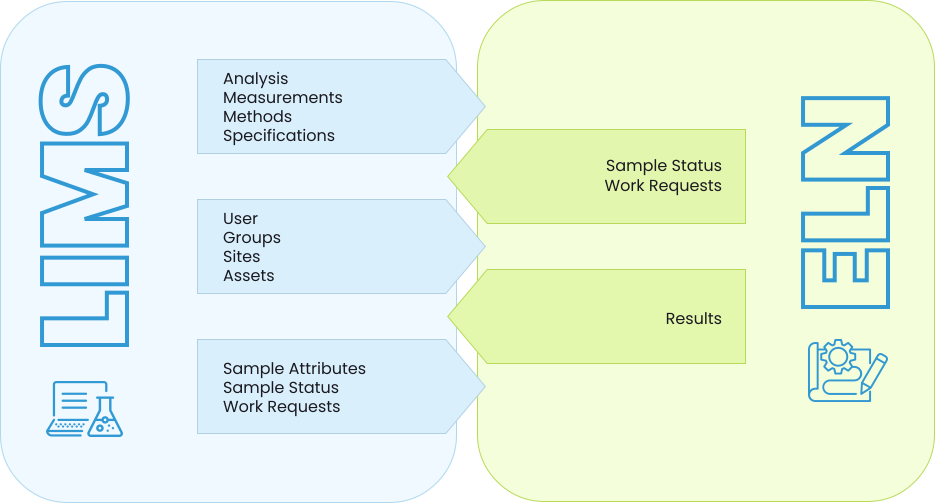 The diagram represents the data objects which must be exposed as a data service from both ELN & LIMS. Additionally, each system must be configured to consume the exposed data objects.
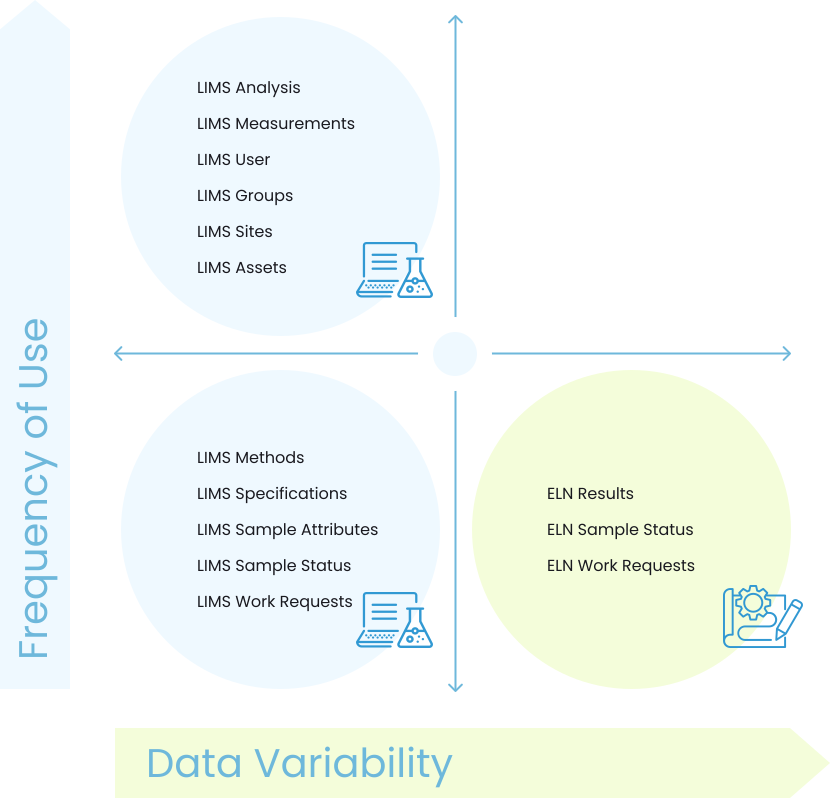 The matrix diagram above identifies projected use and variability for each type of exposed data. Variability is measured in number of times a table is expected to change per day, where low is several changes each day and high is 10 changes or more each day.
In situations with low variability tables, refresh for each usage by the consuming application is not required. The consuming application (ELN) can simply poll to determine if a change has occurred and refresh only when necessary.
In situations with high variability, it must be assumed that the data is often stale and requires refresh. The high variability data defined above is ELN Results, ELN Sample Status, and ELN Work Requests. This data is consumed by LIMS activities such as reports and trending which are less frequent operations.
The matrix diagram above identifies projected use and variability for each type of exposed data. Variability is measured in number of times a table is expected to change per day, where low is several changes each day and high is 10 changes or more each day.
In situations with low variability tables, refresh for each usage by the consuming application is not required. The consuming application (ELN) can simply poll to determine if a change has occurred and refresh only when necessary.
In situations with high variability, it must be assumed that the data is often stale and requires refresh. The high variability data defined above is ELN Results, ELN Sample Status, and ELN Work Requests. This data is consumed by LIMS activities such as reports and trending which are less frequent operations.





Recent Comments